
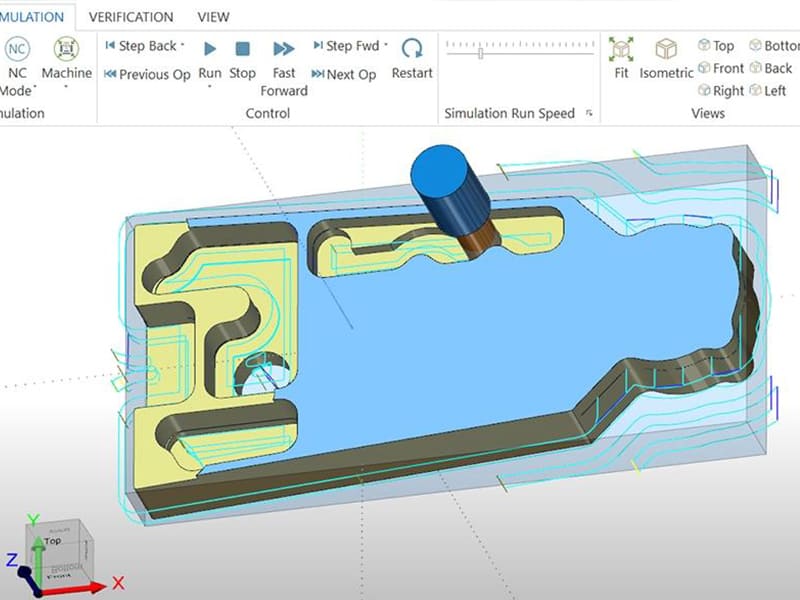
Two identical aluminum housings, same CAD file, same CNC machine — one runs 18 minutes, the other runs 12 minutes with better surface finish and longer tool life. The difference isn’t the machine or the material. It’s the CNC machine programming. Toolpath strategy, feeds and speeds, tool engagement, and cutting sequence determine whether a job runs efficiently or burns through tools and cycle time. We optimize programs daily, and the gap between a passable program and a good one typically runs 20–40% in cycle time alone.
This article covers CNC machine programming from an engineering and production perspective: what it is, how the CAD-to-machine workflow operates, G-code and M-code fundamentals, how toolpaths are created, critical machining parameters, tool selection impact, common programming errors, optimization strategies, and industrial applications. Whether you’re an engineer evaluating machining strategies, a designer improving DFM, or a buyer assessing supplier capability, understanding CNC programming is understanding what drives part quality, cost, and delivery.
What Is CNC Machine Programming?
CNC machine programming creates the instructions that control how a CNC machine manufactures a part. It translates digital design geometry into precise machine movements — defining tool motion, spindle speed, feed rate, tool changes, and coolant activation through a sequence of coded commands.
The workflow runs in four stages: CAD (3D part model with dimensions and tolerances) → CAM (toolpath generation and parameter definition) → G-code (machine-readable instructions post-processed for the specific controller) → Execution (the machine runs the program automatically).
| Factor | Programming Impact |
|---|---|
| Machining accuracy | Controls tolerance and surface finish |
| Tool life | Wrong feeds/speeds accelerate wear |
| Production cost | Inefficient toolpaths waste machine time |
| Cycle time | Optimized programs cut lead time directly |
A CNC programmer’s job goes beyond writing code. They plan toolpaths, select machining strategies (roughing, finishing, adaptive clearing), verify programs through simulation to catch collisions and inefficiencies, and optimize parameters for the specific material and machine. In our shop floor experience, programming quality accounts for more variation in part cost and quality than machine brand or age.
How Does the Programming Workflow Operate?
CAD to CAM
The CAD model defines geometry, tolerances, and critical features. CAM software imports this model and the programmer defines cutting tools, machining operations (roughing, finishing, drilling, contouring), and parameters (feed rate, spindle speed, step-over, depth of cut). Modern CAM systems simulate the entire cutting process before generating code — catching collisions, excessive engagement, and inefficient paths.
G-Code Generation and Execution
CAM outputs G-code through a post-processor matched to the specific CNC controller (FANUC, Siemens, Haas, Heidenhain). The code controls axis movements, spindle commands, tool changes, and coolant. Before cutting, operators verify tool offsets, work coordinates, and fixture setup — typically running a dry cycle to confirm safe motion.
Programming Methods
Manual Programming
Writing G-code line by line without CAM software. Maximum control over every movement. Practical for simple parts, drilling cycles, or quick shop-floor edits. Too slow and error-prone for complex 3D geometry.
CAM Programming
The industry standard. CAM software automatically generates optimized toolpaths from 3D models, handles complex multi-axis geometry, provides simulation, and posts code for specific controllers. Essential for aerospace, automotive, medical, and any precision work. Common platforms: Mastercam, Fusion 360, Siemens NX, SolidCAM.
Conversational Programming
Menu-driven interfaces on the machine controller (Haas, Mazak, Hurco). Operators program directly at the machine using predefined cycles — facing, pocketing, drilling. Fast for simple parts and prototyping. Limited for advanced toolpath strategies.
G-Code and M-Code Fundamentals
G-Code (Motion Commands)
| Code | Function |
|---|---|
| G00 | Rapid positioning (non-cutting) |
| G01 | Linear interpolation (cutting move) |
| G02/G03 | Circular interpolation (CW/CCW) |
| G90/G91 | Absolute/incremental positioning |
Example: G01 X50 Y25 F200 moves the tool in a straight line to X50 Y25 at 200 mm/min feed rate.
M-Code (Machine Functions)
| Code | Function |
|---|---|
| M03/M04 | Spindle on (CW/CCW) |
| M05 | Spindle stop |
| M06 | Tool change |
| M08/M09 | Coolant on/off |
Coordinate Systems
The machine coordinate system (MCS) is the machine’s fixed reference. Work coordinate systems (WCS, typically G54–G59) define the workpiece origin. Tool offsets compensate for length and diameter differences between tools. Correct setup of coordinates and offsets is critical for dimensional accuracy — and one of the most common sources of scrap when done wrong.
How Toolpaths Are Created
Roughing
Removes bulk material quickly. Higher step-over, larger depth of cut, prioritizing efficiency over finish. Common strategies: pocket clearing, Z-level roughing, adaptive clearing (constant tool engagement for stable cutting). Roughing leaves stock allowance for finishing.
Finishing
Refines geometry and produces final surface quality. Smaller step-over, lighter cuts, tighter control. Strategies include contour finishing (walls), parallel finishing (flats/curves), and scallop finishing (complex 3D). Based on our production data, switching from conventional to adaptive roughing on 6061 aluminum typically reduces rough cycle time by 25–35% while extending tool life 40–60%.
Multi-Axis Toolpaths
3-axis handles prismatic parts. Adding a rotary axis (4-axis) enables multi-face indexed machining. 5-axis goes further with simultaneous tool orientation changes for complex surfaces — fewer setups, better accuracy, shorter tools. Essential for aerospace turbine components, medical implants, and complex molds.
Critical Machining Parameters
Feed rate (mm/min): How fast the tool moves through material. Too high → tool breakage, poor finish. Too low → rubbing, heat buildup. Material-dependent — aluminum handles 2–5× the feed rates of stainless steel.
Spindle speed (RPM): Calculated from cutting speed and tool diameter. Aluminum: 6,000–18,000 RPM. Mild steel: 2,000–6,000 RPM. Stainless: 1,500–4,000 RPM.
Depth of cut: Roughing: 2–6 mm. Finishing: 0.2–1 mm. Balances removal rate against cutting forces.
Step-over: Roughing: 40–70% of tool diameter. Finishing: 5–20%. Smaller step-over improves finish but increases time.
Tool offsets: Length and diameter compensation for each tool. Incorrect offsets are the single most common cause of first-part scrap in our shop — tool presetters pay for themselves quickly.
Tool Selection Impact
Tool choice drives machining strategy, parameters, and program structure.
End mills: 2-flute for aluminum (better chip evacuation). 4-flute for steel (higher rigidity). Ball nose for 3D surface finishing. Corner radius for durability.
Drills: Standard twist drills for general holes. Spot drills for positioning accuracy. Peck drilling cycles (G83) for deep holes requiring chip breaking.
Turning inserts: Carbide for general metal cutting. Ceramic for high-speed hardened materials. CBN for finishing hardened steels. Insert geometry and coating must match material and operation.
Coatings (TiAlN, TiCN, DLC) extend tool life by reducing wear and friction — especially critical in stainless steel and titanium where heat concentration accelerates failure.
Common Programming Errors
Tool collisions — incorrect toolpaths, missing clearance moves, or wrong tool lengths. Always simulate before running. One collision can destroy a $5,000 spindle.
Wrong feed rates — too aggressive causes tool breakage; too conservative causes rubbing, heat, and poor finish. Calculate feeds from material data, tool geometry, and machine rigidity.
Incorrect tool offsets — wrong length or diameter values produce dimensional errors on the first part. Use tool presetters and verify offsets before cutting.
Inefficient toolpaths — excessive air cutting, unnecessary tool changes, poor sequencing. One common pitfall we see: programs with 30% non-cutting time that could be halved with basic optimization. CAM simulation and toolpath analysis identify these issues before they cost production hours.
Production Optimization
Cycle Time Reduction
Minimize rapid moves and air cutting. Combine operations where possible. Use high-performance tooling. Increase feeds within safe limits. Reduce tool changes through smart sequencing. In high-volume production, a 15% cycle time reduction compounds into significant annual savings.
Adaptive Machining
Maintains constant tool engagement through smooth curved paths instead of sharp direction changes. Reduces cutting forces, extends tool life, and enables higher feed rates. Especially effective on aluminum, stainless steel, and titanium. Most modern CAM systems support adaptive clearing as a standard strategy.
Simulation and Verification
Run every program through CAM simulation before cutting. Check for collisions, excessive engagement, and inefficient paths. Digital twin technology allows full machine-kinematic simulation. In our production environment, mandatory simulation reduced first-article scrap by approximately 60%.
Industry Applications
Aerospace: 5-axis programming for turbine blades, structural brackets, and engine housings in titanium and nickel alloys. Tolerances to ±0.005 mm. Advanced toolpath strategies manage difficult materials.
Automotive: High-volume programs optimized for cycle time on engine components, transmission housings, and suspension parts. Automated cells running optimized programs produce thousands of parts with minimal intervention.
Medical: Precision programming for surgical instruments, implants, and device housings. Fine surface finish, biocompatible materials, and strict dimensional control.
Industrial equipment: Custom shafts, gears, housings, and automation components. CNC programming flexibility supports low-to-medium volume production with fast design iteration.
Conclusion
CNC machine programming is the critical link between digital design and physical production. Program quality directly controls machining accuracy, tool life, cycle time, and production cost. Well-structured toolpaths with correct feeds, speeds, and tool selection produce better parts faster. Poorly optimized programs waste time, break tools, and generate scrap — regardless of how capable the machine is.
For engineers and buyers, programming quality is one of the most reliable indicators of a CNC supplier’s true capability. A shop that optimizes programs delivers tighter tolerances, shorter lead times, and lower per-part cost. Need help with CNC programming optimization or precision machining? [Contact our engineering team] for toolpath review, DFM support, and production machining services.
FAQ
What is CNC machine programming?
The process of creating coded instructions (primarily G-code) that control CNC machine movements — tool position, spindle speed, feed rate, tool changes, and coolant. Programs are typically generated from CAD models using CAM software, then post-processed for the specific machine controller.
What language do CNC machines use?
G-code for motion commands (tool movement, interpolation, positioning) and M-code for machine functions (spindle on/off, tool change, coolant). Together they form the standard instruction set for most CNC controllers including FANUC, Siemens, Haas, and Heidenhain.
What’s the difference between manual and CAM programming?
Manual programming writes G-code line by line — practical for simple parts but slow and error-prone for complex geometry. CAM programming generates optimized toolpaths automatically from 3D models with simulation and collision detection. CAM is the industry standard for anything beyond basic drilling and facing operations.
How can CNC programs reduce cycle time?
Optimize toolpaths to minimize air cutting and unnecessary moves. Use adaptive machining for constant tool engagement. Select high-performance tools that allow higher feeds. Reduce tool changes through smart sequencing. Simulate before cutting to eliminate inefficiencies. Based on our production data, systematic optimization typically reduces cycle time 15–35% on complex parts.
What are the most common CNC programming errors?
Tool collisions (incorrect paths or clearances), wrong feed rates (too aggressive or too conservative), incorrect tool offsets (producing dimensional errors on first parts), and inefficient toolpaths (excessive non-cutting time). Mandatory simulation and tool presetting prevent the majority of these issues.


