
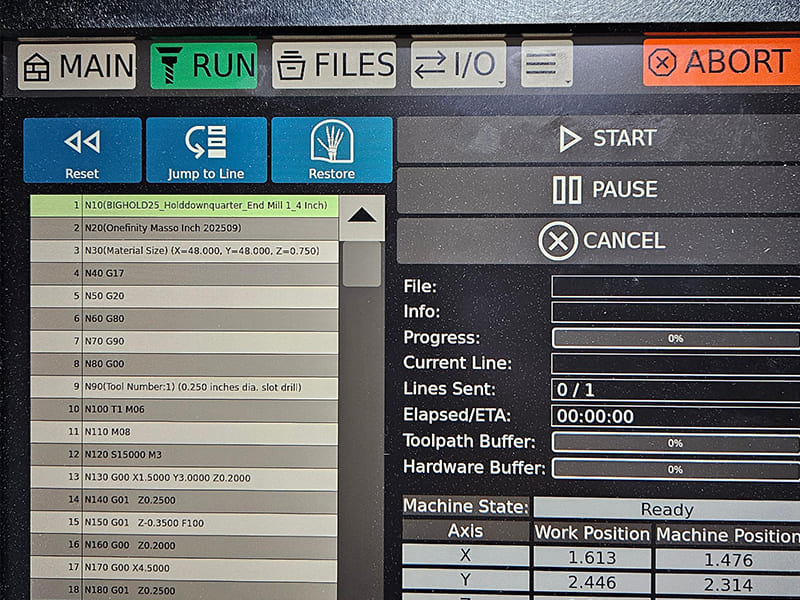
Every move a CNC machine makes — every feed rate, every spindle start, every tool change — is driven by G code and M code. These two command types form the instruction layer between a CAM-generated toolpath and actual metal removal. G code controls geometry and motion; M code controls the machine state that makes that motion safe and effective. Understanding how they work together is what separates programmers who can write reliable production code from those who can only run what CAM generates.
This article covers G code and M code from a practical engineering standpoint: what each controls, how program structure and modal state logic work, common codes with real machining context, controller differences that affect portability, and the programming errors that cause most crashes and scrap. The goal isn’t a command reference list — it’s an understanding of the execution logic that makes CNC programs predictable and repeatable.
What Are G Code and M Code? The Core Distinction
The fundamental split is straightforward. G code controls tool motion and geometry. M code controls machine state and auxiliary functions. Both are required. Neither works without the other.
| Aspect | G Code | M Code |
|---|---|---|
| Primary role | Tool motion and geometry | Machine function and state |
| Controls | Axes, interpolation, feeds, coordinate systems | Spindle, coolant, tool changes, program flow |
| Affects | Accuracy, surface finish, cycle time | Safety, reliability, cutting conditions |
| Examples | G00, G01, G02, G17, G54 | M03, M05, M06, M08, M30 |
G Code: Geometry and Motion Logic
G codes answer the question: how should the tool move to create this geometry? They define positioning mode, interpolation type, feed behavior, and which coordinate system is active. Surface finish quality, dimensional accuracy, and tool load distribution are all directly shaped by how G codes are structured and sequenced.
Think of G code as the geometric brain of the program. It knows where the tool needs to go and how it should get there.
M Code: Machine and PLC Control
M codes answer a different question: how should the machine behave while executing that motion? They handle spindle start and direction, coolant activation, tool changes, and program flow control. All of these functions are managed through the machine’s PLC (Programmable Logic Controller) — a separate control layer from the motion controller.
A useful way to think about it: G code defines the path; M code prepares and maintains the conditions for cutting along that path. A correctly defined toolpath fails immediately if the spindle isn’t running, the wrong tool is loaded, or coolant isn’t active. Those conditions are entirely M code territory.
CNC Program Structure: Blocks, Modal States, and Execution Logic
One of the most important concepts in CNC programming — and one that causes the most unexpected behavior — is understanding that the controller executes programs as a state machine, not as a simple sequential list of instructions.
Blocks and Execution Order
A CNC program consists of blocks — typically one instruction line each. The controller reads each block left to right and executes it as a unit. Critically, the controller doesn’t interpret intent. It only sees the current block combined with whatever modal states were set by previous blocks.
This means two identical-looking motion commands can behave completely differently depending on what was established earlier in the program. Getting this wrong is the root cause of most unexpected CNC behavior.
Modal vs Non-Modal Codes
This distinction is essential for understanding program behavior:
Modal codes remain active until explicitly changed. Once set, they persist across all subsequent blocks until overridden. Examples:
- Motion mode (G00, G01, G02) — stays active until a different motion mode is called
- Positioning mode (G90/G91) — absolute or incremental stays set until changed
- Plane selection (G17/G18/G19) — the active cutting plane persists
Non-modal codes execute once in the block where they appear, then have no further effect. Specific canned cycle cancels and dwell commands are typical examples.
| Behavior | Modal Codes | Non-Modal Codes |
|---|---|---|
| State persistence | Active until changed | Execute once |
| Risk if misunderstood | Unintended motion in later blocks | Usually localized effect |
| Common examples | G00, G01, G90, G91, G17 | One-time actions, specific cycle cancels |
The practical implication: a modal G01 left active from a previous operation will cause the next rapid positioning move to execute as a feed-rate cutting move instead. That’s a crash waiting to happen — and it’s entirely preventable by understanding modal state.
Program Logic Phases
Every reliable CNC program follows three logical phases:
Initialization: Establish machine state explicitly. Set units (G20/G21), plane (G17), positioning mode (G90), work offset (G54 or equivalent), and feed mode. Never rely on controller defaults — they vary between machines.
Machining: G code dominates for motion and geometry. M codes maintain cutting conditions in the background — spindle stays running, coolant stays active, tool remains engaged.
Shutdown: Return to a safe, known state. Tool retracts, spindle and coolant stop, program ends and resets for the next cycle.
Main G Code Types: Motion, Positioning, and Canned Cycles
Rather than listing every G code, understanding the three functional categories clarifies when and why each type is used in practical machining operations.
Motion and Interpolation G Codes
These codes define how the cutting tool moves between points. They have the most direct impact on surface finish, cycle time, and tool loading.
G00 – Rapid positioning Moves the tool at maximum machine speed. Used exclusively for non-cutting moves: approach, retract, tool change positioning, and clearance moves. G00 prioritizes speed over path accuracy — the actual path between points is not a straight line on most machines. Fixture and workpiece clearance must be verified, not assumed.
G01 – Linear interpolation Moves the tool in a straight line at a programmed feed rate. This is the primary cutting motion for most milling and turning operations. Feed rate is specified with F — and that F value persists modally until changed.
G02 / G03 – Circular interpolation G02 generates clockwise arcs; G03 generates counterclockwise arcs. Used for circular pockets, corner radii, fillets, and contouring. Center point or radius (R) must be specified. On most controllers, arc direction is relative to the active plane (G17/G18/G19) — an important detail when programming arcs outside the XY plane.
The critical distinction: G00 is for positioning between cuts. G01/G02/G03 are for material removal. Using G00 where G01 is intended — or leaving G01 active when rapid positioning is needed — is one of the most common causes of crashes and overcuts.
Coordinate System and Positioning G Codes
These codes define where motion occurs, not how the tool moves.
Work coordinate systems (G54–G59) Each offset stores a relationship between machine zero and part zero. Multiple fixtures or setups can be active in the same program by calling different work offsets. In practical machining, G54 is the default for single-setup work; G55–G59 are used for multi-fixture pallets or tombstone fixtures.
G90 – Absolute positioning All coordinates reference the active work zero. A move to X50 always goes to X50 relative to part zero, regardless of current tool position. This is the standard mode for most production programs — it’s predictable and easy to verify.
G91 – Incremental positioning Each coordinate moves relative to the current tool position. G91 is powerful for repetitive patterns and symmetrical features, but dangerous if left active unintentionally. An incremental G01 Z-1.0 means “move down 1mm from wherever you are now” — not from part zero. This is a significant source of depth errors and crashes.
Canned Cycles
Canned cycles condense repetitive drilling, boring, and tapping sequences into single-line calls. Instead of programming approach, feed, dwell, retract, and clearance separately for each hole, a canned cycle handles the complete sequence automatically.
Common examples include G81 (drill), G83 (peck drill for deep holes), G84 (tapping), and G76 (fine boring). Parameters typically include hole depth, retract plane, feed rate, and cycle-specific options.
Two engineering points matter here. First, canned cycles are modal — they remain active until explicitly canceled (typically with G80). Forgetting to cancel a drilling cycle before a repositioning move can cause the machine to drill at every intermediate position. Second, retract behavior varies between controllers — verify peck drilling retract logic before running deep-hole cycles on unfamiliar machines.
Common M Codes: What They Control and Why Timing Matters
M codes are often treated as afterthoughts — basic commands to start the spindle and turn on coolant. In practice, M code timing and sequencing are as critical as toolpath geometry. Getting them wrong costs tools, parts, and sometimes machines.
Spindle Control
M03 – Spindle on (clockwise) Standard cutting direction for right-hand tools. Must be active before any cutting G code executes. Include an S value (spindle speed) in the same block or preceding block.
M04 – Spindle on (counterclockwise) Used for left-hand tools, certain boring operations, and thread milling in specific configurations. Using M04 with a standard right-hand end mill immediately damages both tool and workpiece.
M05 – Spindle stop Required before tool changes, probing operations, and program pauses. On most machines, M06 (tool change) will automatically stop the spindle — but explicitly programming M05 before M06 is better practice and more portable.
Coolant Control
M08 – Coolant on Activates flood coolant. On machines with multiple coolant options, specific M codes may select between flood, mist, and through-spindle coolant — check the machine’s M code list.
M09 – Coolant off Turn off before tool changes and at program end. Leaving coolant active during a tool change creates housekeeping problems and potential safety issues at the tool change position.
Coolant timing matters more than most programmers acknowledge. In titanium machining (Ti-6Al-4V), coolant must be active before the cutting edge engages the workpiece — turning it on after contact is too late for thermal protection. In aluminum 6061, mist or flood coolant prevents built-up edge and maintains surface finish. The M08 call belongs before the first cutting G01, not after.
Tool Change and Program Flow
M06 – Tool change Executes the automatic tool change to the tool specified by a T code. Safe execution requires the tool to be retracted to the tool change position and the spindle to be stopped. Standard sequence: G00 to Z clearance → M05 → T___ → M06.
M00 – Program stop (unconditional) Pauses execution. The machine stops and waits for operator input. Used for in-process inspection, manual operations, or fixture adjustments mid-cycle.
M01 – Optional stop Stops only if the optional stop switch is active at the controller. Useful for inspection points that can be bypassed in production but activated during setup or first-article runs.
M30 – Program end and reset Ends the program and rewinds to the beginning. The correct way to end a production CNC program. M02 ends without rewind — avoid it in production code.
| Function Group | M Codes | Engineering Role |
|---|---|---|
| Spindle | M03 / M04 / M05 | Enable and stop cutting; control direction |
| Coolant | M08 / M09 | Thermal control, chip evacuation, surface finish |
| Tool management | M06 | Tool change sequencing |
| Program flow | M00 / M01 / M30 | Safety stops, inspection, cycle reset |
How G Code and M Code Work Together: A Practical Milling Example
The coordination between G and M codes becomes clear when you trace the execution logic of an actual machining operation. Here’s how a straightforward face milling pass on an aluminum 6061 workpiece looks from a state-management perspective:
Phase 1: Machine Preparation (M codes establish cutting conditions)
G21 G90 G17 G54       ; Set metric, absolute, XY plane, work offset
T01 M06               ; Load face mill (tool change sequence)
S3000 M03             ; Spindle on CW at 3000 RPM
M08                   ; Flood coolant on
G00 Z50.0             ; Rapid to safe Z clearance
G00 X-10.0 Y0         ; Rapid to approach position
Before any cutting motion, the machine state is fully defined: correct tool, spindle running in the right direction at the right speed, coolant active, tool positioned safely above the workpiece.
Phase 2: Cutting Motion (G codes control the path)
G00 Z2.0              ; Rapid to Z approach height
G01 Z-0.5 F200        ; Plunge to cut depth at controlled feed
G01 X110.0 F600       ; Face mill pass across workpiece
The G01 commands control the actual material removal. The spindle and coolant M codes from Phase 1 remain active modally — no need to re-call them for each cut, but they must have been established before Phase 2 begins.
Phase 3: Safe Exit (restore machine to known state)
G01 Z2.0 F600         ; Retract at feed rate (not rapid — controlled)
G00 Z50.0             ; Rapid to full Z clearance
M09                   ; Coolant off
M05                   ; Spindle stop
G00 X0 Y0             ; Return to reference position
M30                   ; Program end and reset
Every element of the exit sequence has a purpose. Retracting at feed rate before going to rapid prevents plunge marks if the tool is still in light contact. Coolant off before spindle stop prevents coolant from being sprayed during coast-down. G00 to home position sets up for the next cycle reliably.
This three-phase logic — prepare, execute, restore — is the mental model that prevents most CNC programming errors.
Controller Differences: Why G Code and M Code Aren’t Truly Universal
ISO 6983 / RS274 provides a common syntax baseline, but controller manufacturers extend and modify behavior significantly. A program that runs cleanly on one machine can produce alarms or unexpected motion on another — even with identical hardware.
Common Areas of Variation
Fanuc-based controllers: The most widely used industrial controllers. Fanuc defines a large common core, but machine builder options add or modify behavior. Macro B syntax, probing M codes, and canned cycle parameters often vary between machines even within the Fanuc family.
Haas controllers: Largely Fanuc-compatible for basic motion G codes, but Haas uses simplified or proprietary M codes for many functions. Programs written on Haas machines often need M code adjustments when transferred to Fanuc machines.
LinuxCNC: Open-source and highly configurable. Supports standard RS274 syntax, but advanced behavior is user-defined. Powerful for custom machines; requires careful configuration documentation to ensure consistent behavior.
| Area | Typical Variation |
|---|---|
| Tool change (M06) | Positioning, safety checks, ATC behavior |
| Canned cycles | Parameters, retract modes, peck behavior |
| Coolant M codes | Multiple coolant types, specific code assignments |
| Macro variables | Syntax, availability, variable numbering |
| Default modal states | Plane selection, feed mode, units at power-on |
Portability Best Practices
The most reliable approach to cross-controller compatibility:
- Never rely on defaults. Explicitly set units, plane, positioning mode, and work offset at program start.
- Avoid controller-specific shortcuts in programs intended for multiple machines.
- Comment non-standard M codes with their function — future programmers won’t know what M88 does on your specific machine without documentation.
- Validate on each controller before first production run, even if the program “should work.”
Common G Code and M Code Errors: Diagnosis and Prevention
Most CNC failures trace back to state-management mistakes, not syntax errors. The controller executed exactly what it was told — the problem is that the programmer didn’t fully account for what modal states were active.
| Error | Root Cause | Prevention |
|---|---|---|
| Modal carryover | G90/G91, G00/G01, or plane selection left active from previous block | Explicitly reset critical modal states at program start and before critical operations |
| Wrong coordinate system | Program assumes a work offset or unit system different from machine setup | Set G54–G59, G90/G91, G20/G21 explicitly — never assume |
| Unexpected rapid motion | G01 still active when rapid positioning is intended, or vice versa | Re-state motion G code on every block where motion intent changes |
| Spindle/coolant timing | M codes placed after cutting motion begins | Treat M08 and M03 as preconditions: active before first G01 |
| Unsafe tool change | M06 called without spindle stop or safe retract position | Enforce standard tool-change sequence: retract → M05 → T___ → M06 |
| Inconsistent cycle behavior | Modal canned cycle (G83, G84) not canceled before repositioning | Cancel canned cycles with G80 explicitly; don’t assume they auto-cancel |
| Program fails on second run | Hidden modal states persist after program end | Use M30 with full shutdown sequence; initialize all states at program start |
A Real Example: Incremental Mode Left Active
A common shop incident: a programmer uses G91 (incremental) for a bolt circle drilling pattern. The canned cycle runs correctly. Then G80 cancels the cycle, but G91 is never reset to G90. The next operation — a pocket milling pass — uses incremental coordinates. Instead of moving to X50 Y30 (absolute), the machine moves 50 mm and 30 mm from wherever it currently is.
Result: milling pass in the wrong location, scrapped part, potential crash.
Fix: add G90 to the line immediately after G80 when returning from incremental mode. One character. Saves a part.
Best Practices for Reliable CNC Programming
Reliable programs share common structural characteristics regardless of the machine or controller. These practices reduce errors, simplify troubleshooting, and make programs maintainable by someone other than the original author.
Initialization Block — Always
Start every program with a complete state initialization:
G21 G90 G17 G54 G94 G40 G49    ; Metric, absolute, XY plane, WCS 1,
                                 ; feed per min, cancel cutter comp, cancel tool length
This single block eliminates most modal state carryover issues. It takes five seconds to write and saves hours of troubleshooting.
Explicit State Changes at Logical Boundaries
Before any new operation type — especially changes between drilling and milling, between different fixtures, or after manual interventions — re-establish the critical modal states. Don’t assume the previous operation left the machine in the right condition.
M Code Sequencing Rules
Follow this order consistently:
- Retract to safe Z clearance
- Spindle stop (M05) if tool change is needed
- Tool change (M06) with T code
- Spindle start at new speed (M03 S___) and coolant on (M08)
- Position to approach point
- Begin cutting motion
Reversing steps 4 and 5 — moving to position before spindle and coolant are active — is technically valid on most controllers but is poor practice. The spindle needs time to reach speed; coolant needs to reach the cutting zone before the tool engages.
Comment Intent, Not Just Syntax
Bad comment: ; G01 X50 F300 (linear move) Good comment: ; Finish pass on datum face - depth 0.1mm, leave 0 stock
Comments should explain why a code sequence exists and what assumptions it makes, not restate what the code already says.
Validate with Simulation Before Running
Even experienced programmers simulate before cutting. Modern CAM simulation catches tool path errors, holder collisions, and rapid-move interference that look correct in the code but cause crashes on the machine. Dry runs at 10% feed with a visual check of each operation phase catch the remaining issues that simulation misses.
Conclusion
G code and M code are not two separate lists of CNC commands — they’re two coordinated layers of a single machine control system. G code defines where and how the tool moves; M code ensures the machine is in the correct state to execute that motion safely and effectively. Understanding how they interact, how modal state persists across program blocks, and how controller differences affect behavior is what makes the difference between code that works reliably in production and code that works once, on one machine, under ideal conditions.
Reliable CNC programming comes from state-management discipline: explicit initialization, predictable execution phases, and careful M code timing. Programmers who understand G code and M code as a coordinated logic system — rather than as isolated commands to memorize — write programs that are portable, safe, and easy to maintain across machines and shifts.
FAQ
Is G code the same for milling and turning machines?
Not exactly. Core motion codes (G01, G02) appear in both, but context differs significantly. Milling uses plane selection (G17/G18/G19) and multi-axis coordinates. Turning centers use diameter/radius control (G7/G8 on some controllers), spindle-synchronized motion for threading (G32, G92), and lathe-specific canned cycles (G71, G72). The underlying syntax is shared; the application logic is different enough that milling experience doesn’t automatically transfer to turning programming.
Are M codes universal across CNC machines?
No — and assuming they are is risky. Basic codes like M03 (spindle CW), M05 (spindle stop), and M30 (program end) are widely consistent. But coolant control, probing, clamping, pallet changes, and automation-related functions vary significantly by controller, machine builder, and configuration. Always verify M code assignments on each specific machine before relying on them.
Why does the same G code behave differently on different controllers?
ISO 6983 defines syntax, not behavior. Controllers extend the standard with their own defaults, options, and interpretations. Canned cycle parameters, arc definitions, default modal states at power-on, and tool change positioning can all differ. Writing explicit, defensive code — setting all modal states rather than relying on defaults — is the only reliable way to handle cross-controller differences.
Can CAM software replace manual G/M code knowledge?
CAM software generates correct toolpaths efficiently, but it doesn’t eliminate the need to understand the code. Engineers and machinists still need G and M code knowledge to verify program logic, debug unexpected behavior, optimize cycle time, and communicate clearly with suppliers and operators. CAM replaces typing; it doesn’t replace engineering judgment.
What are the most dangerous G and M code mistakes?
State-related errors cause the most serious incidents. The highest-risk mistakes are: G00 rapid moves executed too close to the workpiece; G91 incremental mode left active unintentionally; M03 spindle start omitted before cutting motion; M06 tool change called without safe retract; and canned cycles (G83, G84) not canceled before repositioning. None of these produce syntax errors — the controller executes them without complaint. The damage happens mechanically.


