
CAM software has made G-code less visible in day-to-day CNC workflows — but it hasn’t made G-code less important. Every toolpath a CAM system generates eventually becomes a G-code file, and that file is what the CNC controller actually executes, line by line, with no awareness of the CAD model or the machining strategy behind it. When a tool plunges too deep, a cycle time comes in unexpectedly high, or a surface finish doesn’t match the simulation, the answer is almost always in the G-code — not in the CAM setup. Understanding G-code in CNC machining means understanding what the machine is actually doing, rather than what you intended it to do.
This article covers G-code from the perspective of how CNC controllers interpret and execute it in real machining environments. The goal is practical: syntax, structure, modal logic, common errors, and a step-by-step code example that shows exactly what happens at the machine level. Whether you’re debugging a program, reviewing a supplier’s setup, or trying to understand why a quoted cycle time seems wrong, this is the framework to work from.
What Is G-Code and How Does It Control CNC Machines?
The Definition That Actually Matters in Production
G-code is the low-level instruction language that CNC machine controllers execute directly. Each line specifies motion commands, axis positions, feed rates, spindle states, and auxiliary functions. It isn’t descriptive — it doesn’t say “machine this pocket” or “finish this surface.” It says “move to this coordinate at this feed rate in this mode.” The controller follows those instructions exactly, with no interpretation of intent beyond what’s coded.
This distinction matters in practice. CAM software defines what should happen based on geometry and machining strategy. The G-code file defines what the controller will actually execute. These are often close — but not always identical, and the gap between them is where most machining problems live.
How CNC Controllers Read G-Code
Controllers process G-code sequentially, one block at a time. After reading each line, the controller updates its internal state — active motion mode, coordinate system, tool length offset, plane selection — then executes the command. Modal commands stay active until explicitly changed. This is the part that catches most people off guard: a command set 50 lines ago can still be controlling machine behavior on line 200 if nothing cancelled it.
Controllers also apply look-ahead functions, acceleration limits, and interpolation algorithms after reading the G-code — not during CAM generation. Two machines running identical G-code can produce different motion profiles if their controller parameters differ. This is why machining results aren’t fully determined at the CAM stage.
Where G-Code Sits in the CNC Workflow
The flow from design to cutting follows a clear sequence:
CAD model → CAM toolpath strategy → G-code output → CNC controller → Servo motion → Material removal
G-code is the handoff point. Everything upstream is design and planning. Everything downstream is physical cutting. Understanding G-code means understanding what happens at that boundary — which is exactly where problems are hardest to see and most expensive to fix.
How a CNC G-Code Program Is Structured
Blocks, Lines, and Execution Order
A G-code program is built from blocks — individual lines that the controller processes in sequence, top to bottom. Each block represents one instruction cycle. The controller has no awareness of future blocks beyond limited look-ahead, so command order directly determines machine behavior.
A well-structured program follows this sequence:
- Program start and safety initialization
- Units, plane, and coordinate mode declaration
- Tool selection and offset activation
- Machining motions (roughing, finishing, drilling, etc.)
- Retract and tool change (if multiple tools)
- Program sonu ve sıfırlama
Skipping or reordering steps creates risk. A cutting move executed before tool length offset activation, for example, positions the tool based on an uncorrected Z reference — which is a reliable way to produce a crash even when the toolpath geometry is correct.
Address Words: What Each Letter Does
Every block is made up of address words — a letter that identifies the function, followed by a number that defines the value.
- G — Motion or mode command (rapid, linear, circular, plane selection, etc.)
- M — Machine and auxiliary functions (spindle, coolant, tool change, program end)
- X, Y, Z — Axis target positions
- F — Feed rate (distance per minute or per revolution, depending on mode)
- S — Spindle speed (RPM)
- T — Tool number
Multiple address words can appear on one line. The controller interprets them collectively to determine motion type, position, and machine state. The sequence within a block also matters on some controllers — always check the controller manual for block parsing order.
Modal vs Non-Modal Commands
This is the concept that causes the most errors in CNC programming — and the most confusion when debugging.
Modal commands stay active across multiple blocks until explicitly cancelled or replaced. G01 (linear interpolation), G90 (absolute positioning), and F (feed rate) are all modal. Set them once and they apply to every subsequent block until changed.
Non-modal commands apply only to the block they appear in. G04 (dwell) is a typical example — it pauses for one block, then execution continues without the dwell applying again.
The danger with modal commands: a mode set early in the program controls behavior for everything that follows, including blocks written much later. A missing G00-to-G01 transition where one is expected, or a feed rate that wasn’t updated between operations, can produce incorrect motion without triggering any controller alarm.
Breaking Down a Typical G-Code Line
G01 X50.0 Y20.0 Z-5.0 F300
- G01 — Linear interpolation (modal; stays active until another motion mode is specified)
- X50.0 Y20.0 Z-5.0 — Target position in current coordinate system
- F300 — Feed rate of 300 mm/min (modal; applies to all subsequent cutting moves)
If the next block reads X80.0 Y20.0 with no G-code, the machine moves linearly at 300 mm/min to the new position — because G01 and F300 are still active. That’s correct behavior if intended, and a problem if not expected.
The Most Common G-Codes Used in CNC Machining
Motion Commands: G00, G01, G02, G03
These four codes account for the majority of motion in any CNC program.
G00 — Rapid Positioning Moves the tool to a position at the machine’s maximum traverse speed. The controller does not respect the programmed feed rate during G00. Use it exclusively for non-cutting moves — clearance positions, tool change approaches, and repositioning above the part. Never use G00 while the tool is in contact with material; feed rate limits don’t apply and the result is unpredictable.
G01 — Linear Interpolation Executes a straight-line cutting move at the programmed feed rate. This is the primary cutting command for milling, turning, and any controlled material removal. Feed rate selection should reflect tool diameter, material, and coating — not a generic “safe” value. For aluminum 6061 with a 10 mm carbide end mill, F400–600 mm/min at S8000–12000 RPM is typically appropriate. For 316L stainless with the same tool, F100–180 mm/min at S3000–5000 RPM is more realistic due to work-hardening behavior.
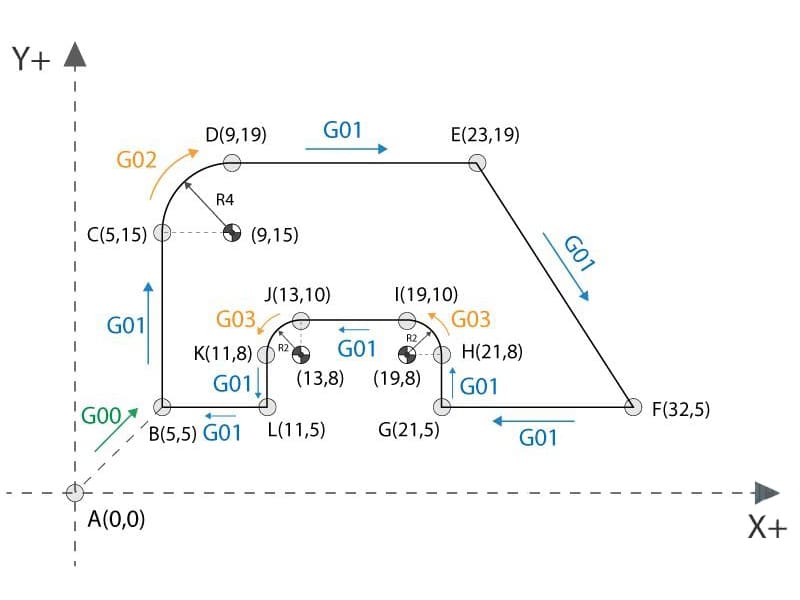
G02 / G03 — Circular Interpolation (CW / CCW) Generates arc motion in the active plane. G02 moves clockwise; G03 counterclockwise. Arc geometry is defined by start point, end point, and either a center offset (I, J, K) or a radius value (R). Poorly defined arc geometry — where the start and end points don’t match the specified radius — produces controller alarms or overcuts. Always verify arc definitions in simulation before cutting.
Plane Selection and Units: G17–G19, G20, G21
G17, G18, G19 select the active machining plane: XY, XZ, and YZ respectively. Plane selection directly affects how G02/G03 arcs are interpreted. A G02 arc programmed with XY coordinates behaves correctly in G17 but produces incorrect motion if G18 or G19 is active from a previous operation.
G20 / G21 declare inch or metric units. This must always be set explicitly at program start. Inheriting units from a previous program is one of the less obvious ways to crash a machine — the controller scales all positions by the unit conversion factor, which moves the tool to locations nowhere near the intended positions.
Positioning Modes: G90 vs G91
G90 — Absolute Positioning: All coordinates reference the active work zero. This is the standard mode for most CNC machining because every position is unambiguous — X50.0 always means 50 mm from zero, regardless of where the tool was previously.
G91 — Incremental Positioning: Coordinates reference the tool’s current position. Useful for repetitive patterns (hole arrays, slot spacing) where defining everything from zero would require calculation. The risk is cumulative error — a rounding error in one move shifts every subsequent incremental position. Use G91 deliberately and always return to G90 after the incremental sequence.
Safety and Reference Codes
G04 (Dwell): Pauses motion for a defined time or number of spindle revolutions. Common uses include chip breaking during deep drilling and allowing the spindle to stabilize after a speed change before beginning a precision finish pass.
G28 (Machine Reference Return): Sends axes through an intermediate point to machine home. The intermediate point is critical — if it’s not explicitly defined in a safe position, G28 can drive the tool through the part or fixture on the way to home.
G53 (Machine Coordinate Move): Moves directly in machine coordinates, bypassing work offsets. More predictable than G28 for parking moves and tool changes when used correctly.
| Kategori | G-Kodu | İşlev | Tipik Kullanım |
|---|---|---|---|
| Motion | G00 | Rapid move | Non-cutting positioning |
| Motion | G01 | Linear cut | Controlled machining |
| Motion | G02 / G03 | Circular cut | Arcs, pockets, profiles |
| Plane | G17–G19 | Plane selection | Arc direction definition |
| Units | G20 / G21 | Inch / Metric | Program initialization |
| Positioning | G90 / G91 | Absolute / Incremental | Coordinate control |
| Güvenlik | G28 / G53 | Reference moves | Tool change, clearance |
M-Codes and How They Work Alongside G-Code
What M-Codes Control
While G-codes govern how the tool moves through space, M-codes govern what the machine does — spindle on/off, coolant on/off, tool change, and program flow. In practical machining operations, M-codes define the machine state that G-code cutting moves assume is already in effect. A cutting move (G01) executed without an active spindle (M03) damages the tool and the workpiece. A tool change (M06) executed without proper axis clearance risks a collision.
The M-Codes That Appear in Almost Every Program
- M03 — Spindle on, clockwise rotation
- M04 — Spindle on, counterclockwise (used for specific operations like reverse tapping)
- M05 — Spindle stop
- M06 — Tool change (pauses execution until the change is complete)
- M08 — Coolant on
- M09 — Coolant off
- M30 — Program end and reset to start
Sequencing matters. M03 must appear before the first cutting move. M08 should be activated before the tool engages material, not during. M06 requires the machine to be at a safe position — typically verified by a G28 or G53 move to a defined tool change location.
G-Code and M-Code: Complementary, Not Interchangeable
| Aspect | G-Kodu | M-Kodu |
|---|---|---|
| Birincil rol | Tool motion and path control | Machine state and auxiliary functions |
| Typical actions | Linear moves, arcs, positioning | Spindle, coolant, tool change, program end |
| Execution impact | Geometry and feed rate | Cutting readiness and machine safety |
| Risk if wrong | Collision, dimensional error | Tool damage, unsafe tool change |
Feed Rate, Spindle Speed, and Tool Commands: How They Affect Part Quality
Feed Rate (F) and Surface Finish
Feed rate directly determines chip load — the thickness of material each cutting edge removes per revolution. Too high, and the tool overloads: chatter, tearing, and poor surface finish follow. Too low, and the tool rubs rather than cuts, concentrating heat at the cutting edge and promoting built-up edge formation, which also degrades finish.
The relationship between feed rate and surface finish is material-specific. For aluminum 6061, a 10 mm end mill running at S10000 RPM with F500 mm/min produces a chip load of approximately 0.025 mm per tooth (assuming a 2-flute tool) — typically yielding Ra 1.6–3.2 µm in a roughing pass. Dropping to F200 mm/min reduces chip load but increases heat and rubbing, often worsening finish rather than improving it. Finish passes use reduced depths of cut, not necessarily reduced feed rates, to achieve Ra 0.8 µm or better.
For 316L stainless, feed rates are significantly lower — typically F100–180 mm/min — because the material work-hardens under cutting. Exceeding recommended chip loads causes rapid tool wear and surface tearing. Consistent coolant application (flood or through-tool) is essential to manage heat and prevent work-hardening buildup between passes.
Spindle Speed (S) and Cutting Performance
Spindle speed sets surface cutting speed at the tool’s outer diameter. The correct speed depends on tool diameter, material, and tool coating. A TiAlN-coated 10 mm carbide end mill cutting aluminum 6061 typically runs at 200–400 m/min surface speed — translating to approximately S6,400–12,700 RPM. The same tool in 316L stainless runs at 40–80 m/min surface speed — approximately S1,270–2,550 RPM — to limit heat generation and tool wear.
Excessive spindle speed in stainless generates concentrated heat that softens the cutting edge, dramatically shortening tool life. Insufficient speed in aluminum produces inefficient cutting and poor chip evacuation. Getting spindle speed right is not about using conservative values — it’s about matching the speed to what the tool and material actually require.
Tool Commands and Offset Activation
Tool selection (T) specifies which tool to load. Tool length compensation (G43 with H offset) applies the correct Z-axis reference for that specific tool. If the wrong offset is activated — or if G43 is omitted entirely — the Z-axis reference shifts by the difference between the programmed offset and the actual tool length. This produces a plunge too deep or a retract insufficient to clear the part.
Before any tool change, the machine must be at a safe position. Most controllers require explicit positioning to a tool change location before M06 executes. Skipping this step risks a collision between the tool and the workpiece or fixture during the change.
Reading G-Code Step by Step: A Complete Milling Example
Reading G-code correctly means tracking machine state after every line — not just reading positions. Here’s a complete 2D milling program with engineering commentary on what each section actually does at the machine.
%
O1001
G21 G90 G17
G00 X0 Y0
T1 M06
S8000 M03
G43 H01 Z50.0
G00 Z5.0
G01 Z-2.0 F200
G01 X50.0 Y0.0 F400
G01 X50.0 Y30.0
G01 X0.0 Y30.0
G01 X0.0 Y0.0
G00 Z50.0
M05
M30
%
G21 G90 G17 — Sets metric units, absolute positioning, and XY plane. These three modal states control coordinate interpretation for the entire program. Missing any one of them means inheriting the previous program’s state — a common source of unexpected behavior when running programs sequentially.
G00 X0 Y0 — Rapid move to program zero in XY. No cutting. The tool moves at full rapid speed; there is no feed rate protection.
T1 M06 — Selects Tool 1 and executes a tool change. Execution pauses until the change is complete. The machine must be at its designated tool change position before this line, or a collision risk exists.
S8000 M03 — Starts the spindle at 8,000 RPM clockwise. For a 10 mm end mill in aluminum 6061, this corresponds to approximately 251 m/min surface speed — within the efficient cutting range for uncoated or TiN-coated carbide.
G43 H01 Z50.0 — Activates tool length compensation using offset H01 and moves to Z50 in the corrected reference frame. This is the line that establishes the correct Z datum for cutting. Missing G43 means the tool’s Z position is referenced without the actual tool length applied.
G00 Z5.0 — Rapid approach to 5 mm above the work surface. Still no cutting — the tool is positioning above the part.
G01 Z-2.0 F200 — Controlled plunge to 2 mm depth at F200 mm/min. The reduced feed rate during plunge limits axial cutting load. At F200 with a 2-flute 10 mm end mill, the chip load per tooth on the plunge is approximately 0.0125 mm — conservative but appropriate for a Z-entry move.
G01 X50.0 Y0.0 F400 — First linear cutting move. The feed rate increases to F400 mm/min for the lateral cutting pass, producing a chip load of approximately 0.025 mm per tooth at S8000 RPM — typical for aluminum roughing.
Subsequent G01 moves — Trace the remaining three sides of the rectangular profile. G01 and F400 remain active (modal) — no need to restate them unless the feed changes.
G00 Z50.0 — Rapid retract to safe Z height. Cutting is complete; the machine exits at full rapid speed.
M05 — Spindle stop. Always stop the spindle before program end.
M30 — Program end and reset. The controller returns to the beginning of the program, ready for the next part.
Common Reading Mistakes
Ignoring modal state: G01 and F400 stay active until explicitly changed. A programmer who adds a new move later and forgets these are still active will get a cutting move where a rapid was intended.
Assuming order is flexible: Spindle on (M03) must precede cutting motion. Tool offset (G43) must activate before Z positioning. These aren’t suggestions — they’re requirements for safe execution.
Reading coordinates without tracking state: A position like Z-2.0 only makes sense in context of the active coordinate system, tool offset, and positioning mode. Read the state, then read the coordinates.
Common G-Code Errors and How to Diagnose Them
Most serious CNC problems don’t come from complex code. They come from small modal errors, wrong offsets, or unit mismatches that propagate through the program.
Modal Errors
A modal command set incorrectly — or never cancelled after use — affects every block that follows until something changes it. G91 (incremental mode) left active after a probing subroutine causes all subsequent absolute-intended moves to execute as incremental offsets. The tool ends up nowhere near the intended location, and the controller generates no alarm because the move was syntactically valid.
These errors don’t reveal themselves by scanning individual lines. They require tracking machine state through the program sequence — mentally or through simulation.
Coordinate and Offset Errors
The highest-risk G-code errors involve coordinate system and offset mistakes:
- Wrong work offset (e.g., G54 selected when the program expects G55)
- Incorrect or missing tool length compensation (G43/H mismatch)
- G90/G91 confusion when switching between absolute and incremental modes
Each of these can produce a crash or scrap part without any syntax error. The controller does exactly what the code says — it just isn’t what was intended.
Diagnosis Approach: Layered Validation
The standard engineering approach to G-code validation works through layers of increasing confidence:
- Code review — check units, coordinate systems, offset activations, and modal resets
- CAM or controller simulation — verify motion graphically before anything runs
- Dry run — execute with spindle off and Z-axis offset raised by 50–100 mm
- Single-block with feed override — run the actual program one line at a time at reduced speed
| Error Type | Risk | Önleme |
|---|---|---|
| Modal command not reset | Unexpected cutting motion | Explicitly restate critical G-codes at each operation |
| Yanlış koordinat sistemi | Machining at wrong location | Always set work offset at program start |
| Missing tool length offset | Tool crash or overcut | Activate G43 with verified H value before Z motion |
| Unit mismatch (G20/G21) | Scaled positions or crash | Declare units explicitly — never rely on default |
| Unsafe rapid move | Collision | Use clearance planes and verify dry run behavior |
Advanced G-Code: Macros, Subprograms, and Canned Cycles
Macro Variables and Parametric Programming
Macro programming introduces variables into G-code, allowing parametric and conditional logic that static programs can’t achieve. Instead of hard-coding depths, positions, or feed rates, engineers define values once and reference them throughout the program.
#100 = 20.0   (Pocket length)
#101 = 5.0    (Cut depth)
G01 X#100 Z-#101 F300
This approach is particularly valuable for part families — where bore diameter, pocket depth, or hole spacing varies by configuration — and for on-machine measurement cycles that adapt machining parameters based on probing results. The trade-off is complexity: macros require careful documentation and validation, and errors in conditional logic can produce unexpected motion.
Subprograms and Repeated Features
Subprograms (called with M98, returned with M99) allow repeated motion sequences to be defined once and executed multiple times. A hole pattern that appears six times on a part doesn’t need six copies of the drilling sequence — one subprogram handles all instances.
M98 P2000 L6 (Call subprogram O2000 six times)
Beyond code brevity, subprograms improve consistency: all six holes follow exactly the same motion sequence. Any update to the drilling strategy — feed rate, depth, peck increment — requires changing one subprogram, not six separate code blocks.
Canned Cycles: Productivity Without Lost Control
Canned cycles package common machining sequences (drill, tap, bore, ream) into single commands. A drilling cycle that would otherwise require separate approach, plunge, dwell, and retract blocks becomes one line:
G81 X20.0 Y10.0 Z-15.0 R2.0 F200
This reduces programming time, shortens code, and produces consistent behavior across all holes in the pattern. The important caveat: canned cycles must be cancelled with G80 when complete, and their parameters (retract mode, dwell, peck increment) must match the controller’s implementation. Canned cycle behavior varies between Fanuc, Haas, and Siemens controllers — always verify against the machine-specific programming manual.
How G-Code Varies Between CNC Controllers
Fanuc, Haas, and Beyond
Fanuc-based controllers are the closest thing the industry has to a standard G-code reference. Many machine tool builders base their control systems on Fanuc architecture, making Fanuc-compatible code reasonably portable across machines. Haas controllers are largely Fanuc-compatible but include proprietary extensions, different default modal states, and Haas-specific macro syntax that can alter execution behavior on shared programs.
Siemens and Heidenhain controllers use G-code syntax but operate quite differently in practice. Heidenhain in particular relies on conversational input for many operations. Mazatrol (Mazak’s proprietary system) is primarily conversational with G-code as a secondary option. Programs written for one controller type frequently require post-processor regeneration — not just editing — before running on a different platform.
Why G-Code Is Not Universal
Specific differences that matter in practice:
- Supported G and M code sets vary — some codes valid on one controller generate alarms on another
- Canned cycle parameters (peck depth, retract type, dwell timing) differ between manufacturers
- Macro variable syntax and conditional logic commands are controller-specific
- Look-ahead algorithms and acceleration profiles affect motion smoothness even when the G-code is identical
This is why CAM post-processors are machine-specific rather than generic. The post-processor translates CAM toolpaths into the correct G-code dialect for the target controller — not into universal G-code that any machine can run.
What Designers and Procurement Teams Need to Know
From a procurement standpoint, G-code should be treated as machine-specific production data. Sharing a G-code file between suppliers assumes identical machines and controllers — an assumption that frequently doesn’t hold. Best practice is to share CAD and CAM data rather than final G-code, and to confirm machine type and controller version before programs are transferred. When G-code must be shared, simulation on the receiving controller before cutting is essential.
Sonuç
G-code in CNC machining is the final layer between design intent and physical cutting. CAM systems plan the toolpath; the G-code file is what the machine actually executes. Understanding G-code structure, modal logic, and execution sequence gives engineers direct visibility into what’s happening at the cutting edge — and why problems occur when they do.
For anyone working in CNC environments — whether writing programs, reviewing supplier setups, or troubleshooting machining issues — G-code literacy means faster diagnosis, better communication with operators, and fewer surprises on the shop floor. You don’t need to write G-code from scratch in a CAM-driven workflow. You do need to read it, understand what the machine will do, and recognize when something in the code doesn’t match the intended result.
Sıkça Sorulan Sorular
Do all CNC machines use the same G-code?
No. G-code is not fully standardized across the industry. Fanuc, Haas, Siemens, and Heidenhain controllers all use G-code syntax with varying command sets, canned cycle definitions, macro syntax, and default modal states. Programs that run correctly on one controller may trigger alarms or produce different motion on another. This is why CAM post-processors are controller-specific.
Can CNC machines run without G-code?
At the control level, no. Even conversational programming and CAM-generated toolpaths are ultimately translated into G-code (or equivalent low-level instructions) for execution. G-code is the machine’s native execution language — everything else is a layer on top of it.
Is manual G-code programming still necessary?
Full manual programming is rarely required in production environments. However, reading and modifying G-code is still a practical skill for debugging, cycle time optimization, small edits to existing programs, and communicating with machine operators and suppliers. Most CNC engineers don’t write programs from scratch — but they regularly work with G-code files.
How do I safely test a new G-code program?
Follow a layered validation approach: review the code for units, coordinate systems, and offset declarations; run CAM or controller simulation; perform a dry run with the spindle off and Z-axis raised 50–100 mm above the part; then run single-block at reduced feed override before committing to a full cycle.
What’s the difference between G-code and conversational programming?
G-code is explicit and text-based — every machine action is directly coded. Conversational programming uses menus and prompts to define operations, which the controller converts to G-code internally. Conversational is faster for simple parts on the machine; G-code offers more transparency, portability, and control for complex multi-operation programs.


